
Microsoft Office 365 Training
Unleash the power of Microsoft 365 with our comprehensive training courses.
Features
What makes Soft Skill Studio Unique?
We offer a variety of learning options, including online courses, live webinars, and in-person workshops, to accommodate different learning styles and schedules.

Expert-led training
Our training courses are led by Microsoft Certified Solutions Experts who have years of experience using Microsoft 365 in real-world business environments.

Master Every M365 Tool
Our training curriculum is designed to provide learners with a comprehensive understanding of all of the essential Microsoft 365 products and features.

Flexible Learning Options
We offer a variety of learning options to accommodate different learning styles and schedules. Our online courses can be delivered virtually to anywhere in the world.
Upcoming Free Public Webinar
Work Smarter, Not Harder: Supercharging Teams with M365 Copilot
4 Sept 2025
Build confidence with simple tips to adopt Teams + Copilot in your daily work
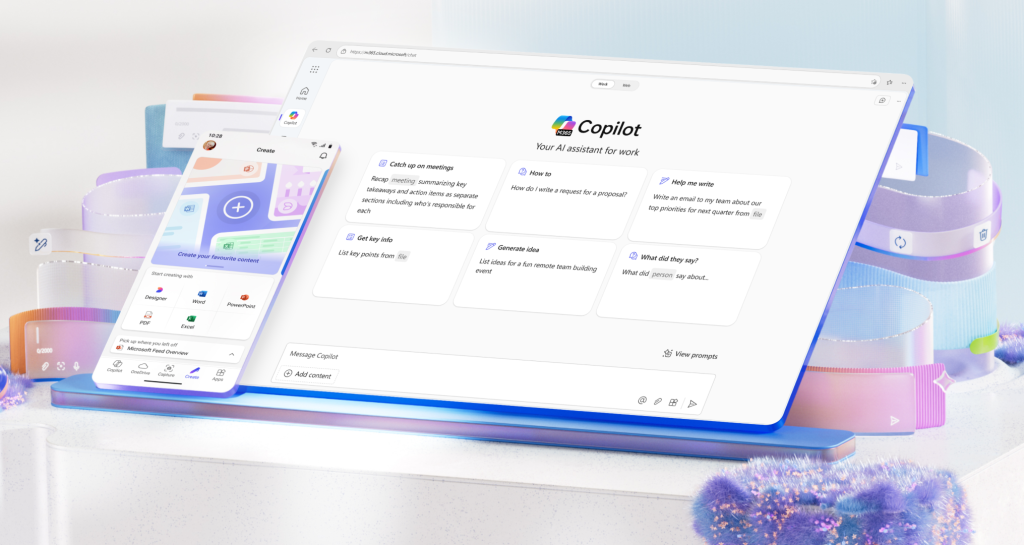
M365 Copilot Training Available! Get in contact for a free consultation.
Take a look at our Training Catalogue!
Still not sure which course is right for you? Let our experienced advisors help you make the best decision. Give us a call today!
Special prices applied for multiple users or bundles.
Introduction to Microsoft Teams
Beginner Level
Duration 2h. The Session covers an unlimited number of participants
- Navigate the interface of Microsoft Teams
- Locating your settings and your profile
- Search section and key features
- Organise your workspace
- Send your first chat
- Locate your file repository
£400
FLAT RATE per session
Communication and Collaboration inside Microsoft Teams
Intermediate Level
Duration 2h. The Session covers an unlimited number of participants
- Chat vs channels-what is the difference
- Organise your chat space with 1:1 conversations and group conversations
- Tools available in your chat space
- Increase productivity in your channels with your existing tools and more
£400
FLAT RATE per session
M365 Cloud Storage-OneDrive vs. SharePoint
Beginner Level
Duration 2h. The Session covers an unlimited number of participants
- Learn what cloud storage available in M365 and where it integrates
- Understand the difference and connection between OneDrive and SharePoint Online
- Integration of Cloud services in Microsoft Teams
- File management; access and edit your files from any device
- Real-time collaboration
£400
FLAT RATE per session
Elevate your SharePoint Online Skills
Intermediate Level
Duration 2h. The Session covers an unlimited number of participants
- Understanding the different types of sites that exist on SharePoint Online
- Plan and create a site(team site or communication site) from scratch
- Edit the look of your site using web parts
- Control access to sites and resources at a more detailed level
- Site analytics and usage
£400
FLAT RATE per session
Introduction to Microsoft Bookings
Beginner Level
Duration 2h. The Session covers an unlimited number of participants
- Understand the Microsoft Bookings functionality
- Access and navigate the interface
- Create your first booking page
- Organise your staff
- Learn how to customise the experience for your customers
- Integration with Microsoft Teams
£400
FLAT RATE per session
Introduction to Microsoft Outlook Level 2*
Intermediate Level
Duration 2h. The Session covers an unlimited number of participants
- Craft professional email responses and manage delays
- Delegate access for seamless collaboration
- Automate tasks and organize your inbox with rules
- Customize your mailbox layout for productivity
- Utilize categories and task management for workload prioritization
£400
FLAT RATE per session
Introduction to Microsoft PowerPoint
Beginner Level
Duration 2h. The Session covers an unlimited number of participants
- Navigate the PowerPoint interface
- Customize your preferences
- Access templates to create your first presentation
- Create your first presentation deck
- Use design ideas and customize your slide with different tools
- Share and collaborate with others
£400
FLAT RATE per session
Organising Teams & Channels in Microsoft Teams
Intermediate Level
Duration 2h. The Session covers an unlimited number of participants
- Understand the difference between teams and channels, Channel types & Structure
- Learn how to create your first team or how to join an existing one
- Structure your team with channels and collaborate effectively
£400
FLAT RATE per session
Get started with Microsoft Teams Telephony
Beginner Level
Duration 2h. The Session covers an unlimited number of participants
- Customise call settings and configure your voicemail
- Organise your contacts
- Access your call history
- Utilise call forwarding options
- Dial-in option for meetings
£400
FLAT RATE per session
Cloud Storage: OneDrive for Business
Beginner Level
Duration 2h. The Session covers an unlimited number of participants
- Learn to navigate the OneDrive platform for desktop and online
- The purpose of using OneDrive for Business
- Learn the different way that files can be stored, organised and edited
- Manage the access of your documents
£400
FLAT RATE per session
Introduction to Microsoft Lists
Beginner Level
Duration 2h. The Session covers an unlimited number of participants
- Navigate the interface of Microsoft Lists
- Create and share your first list
- Manage control to your list
- Integration with Microsoft Teams and SharePoint Online
£400
FLAT RATE per session
Introduction to Microsoft Forms
Beginner Level
Duration 2h. The Session covers an unlimited number of participants
- Access and navigate Microsoft Forms
- Create your first survey and customise it to your need
- Create your first quiz
- Share and collect responses
- Control the access to your form
- Analyse the data collected and decide what you want to do next with it
£400
FLAT RATE per session
Introduction to Microsoft Excel
Beginner Level
Duration 2h. The Session covers an unlimited number of participants
- Navigate the Excel interface with ease
- Utilize templates to kickstart your data analysis
- Customize and personalize your Excel settings
- Create your first table and chart from scratch
- Learn essential basic formulas for data manipulation
£400
FLAT RATE per session
Introduction to Microsoft Power BI Service
Beginner Level
Duration 2h. The Session covers an unlimited number of participants
- Connecting to data sources
- Understand the workspace you work in
- Understand OneLake Data Hub
- Creating reports and dashboards
- Create and customise visualizations
- Sharing and collaboration
- Integration with Teams
£400
FLAT RATE per session
Types of meetings inside Microsoft Teams
Intermediate Level
Duration 2h. The Session covers an unlimited number of participants
- Learn about the different types of video conferences
- Create your meeting and customise it accordingly
- Interactive tools inside meetings
- Leverage breakout rooms in meetings
- Resources available before, during & after meetings
£400
FLAT RATE per session
Integrating Apps in Microsoft Teams
Beginner Level
Duration 2h. The Session covers an unlimited number of participants
- Find and navigate your apps library
- Customise your navigation menu
- Integrate applications in your workspaces
- Install and uninstall apps
£400
FLAT RATE per session
Introduction to SharePoint Online
Beginner Level
Duration 2h. The Session covers an unlimited number of participants
- Access SharePoint Online and navigate the interface
- Learn the SharePoint structure
- Access a teams’ site and all of it’s resources
- Understand M365 groups
- Customise a teams site
- Store and manage files
£400
FLAT RATE per session
Introduction to Microsoft Planner
Beginner Level
Duration 2h. The Session covers an unlimited number of participants
- Access and navigate the Microsoft Planner interface
- Create and organise your first plan
- Assign tasks to project participants
- Elaborate on tasks with integrated tools
- Integration with M365(Teams, SharePoint)
£400
FLAT RATE per session
Introduction to Microsoft Outlook Level 1
Beginner Level
Duration 2h. The Session covers an unlimited number of participants
- Effortlessly plan, organize, and manage projects with Microsoft Planner.
- Create and organize plans with ease to keep your projects on schedule.
- Assign tasks seamlessly and collaborate effectively with team members.
- Enhance tasks with integrated tools for streamlined project management.
- Unleash the power of Microsoft 365 integrations for unified project management.
£400
FLAT RATE per session
Step up your Microsoft Excel game
Intermediate Level
Duration 2h. The Session covers an unlimited number of participants
- Format tables and charts
- Create rules using conditional formatting
- Understand data validation
- Learn and use more formulas
- Create a pivot table and customise it
£400
FLAT RATE per session
Introduction to Microsoft Power BI Desktop
Beginner Level
Duration 2h. The Session covers an unlimited number of participants
- Navigate the Power Bi Desktop
- Explore the full data source spectrum
- Connect and transform your data with Power Query
- Model your data and create new measures
- Create a report and publish to Power Bi service
£400
FLAT RATE per session
1 Full Day Course
Level of Choice
Whole Day Course with a M365 Application of choice.The Session covers an unlimited number of participants
- Free choice of M365 App
- Customised Agenda
- In depth Course
£700
FLAT RATE per session
All above prices include VAT.
We’re so confident in the quality of our training that we offer a 100% money-back guarantee.
what course is for me
Frequently Asked Questions
The FAQ section is a comprehensive resource that provides answers to commonly asked questions about our company, products, or services.
What is Microsoft 365?
Microsoft 365(or M365 for short) is Microsoft 365 is the new name for Office 365, offering innovative apps, intelligent cloud services, and world-class security for home, business, and enterprise. The bundle is composed of three significant pieces: user-based licenses for Windows OS, user-based license for Office 365, and management tools suitable for the intended audience( IT staff, administrators or just regular end users).
Why should I choose your Microsoft 365 Training Website?
As someone who has worked with this technology for the last nearly 10 years, 5 of which where inside the company, we understand how important it is to effectively use these tools to maximise your productivity. It is not just about multi tasking anymore but mostly organising and pairing applications so that you can focus your attention on more strategic work. Our training materials cover most aspects of Microsoft 365, from basic usage to advanced features. This ensures that you can find the information you need, regardless of your current skill level. Agendas can also be customised in line with your internal projects and desired outcomes.
What are your Training Options?
Our training sessions can be conducted online via Microsoft Teams Live Events or Meetings depending on the request but also if needed on site training can be offered at customer locations.
How much does your Training Cost?
After doing a little bit of market research, we have tried to assess an affordable price of £350 per course. The price includes any customisation of agenda and the recording of the training session so that you can share it with your users internally . The limit of participants per session is of 20 attendees and any other user that needs to be added past that limit will only cost you £10 extra
What does your Training Curriculum Cover?
As the company is at the very start of the journey, we will try to start with a catalogue of 20 different agendas covering different applications and aspects from the M365 suite. E.g. Microsoft Teams( for this particular application we have different agendas covering anything from a general overview, to more focused training, organising your workspace with channels and communication, effectively organising meetings or even integrating different applications in the platform).
What is the level of Difficulty of your Training Courses?
We have all 3 levels of learning available: beginner, intermediate and advanced.
Testimonials
Our Reviews
Get an in-depth look at what people have to say about our M365 training courses and discover how our training can help you achieve your Microsoft 365 goals.
Highly Recommended to Any Professional!
I took the “M365 Essentials” course, and it was exactly what I needed. The instructor was knowledgeable and patient, and the course covered everything from basic tasks like creating documents and spreadsheets to more advanced topics like using Power BI and Microsoft Teams!
Kalli
Account Manager
M365 Training That’s Actually Useful!
I signed up for an M365 training course because I wanted to learn how to use the software more effectively. I was pleasantly surprised by how much I learned in just a few short weeks. The instructor was very knowledgeable and patient, and the course covered everything from basic tasks to more advanced topics. I’m now able to use M365 to do things that I never thought possible before.
Sarah
Customer Success Manager
Agenda Customization that Fits me!
I’ve always been intimidated by Microsoft 365, but I decided to take an online training course to see if I could overcome my fears. The course was much easier than I expected, and I learned a lot in just a few hours. The instructor was very patient and helpful, and she made the material easy to understand. I’m now able to use M365 with confidence, and I’m glad I took the course.
James
Project Manager
100%
Money Back Guarantee
We are so confident in the quality of our products and services that we offer a 100% money-back guarantee.
Training
To suit your needs
We offer both Virtual and In-Person Trainings.
We offer
Training in Multiple Languages
English, Romanian, and soon many other to be added.
Our Blog
Supercharge your productivity and unleash the full potential of Microsoft 365 with our blog, where you’ll find a wealth of tutorials, guides, and actionable strategies to transform your workplace and achieve remarkable results.